


Phone Call
4.2817.00 Reviews
App Specs
- Version
- 1.19
- Updated On
- License
- Free
- Downloads
- 5,000,000+
- Developer
- Call Log Manager
- Categories
- Tools
- Platform
- Android
Screenshots
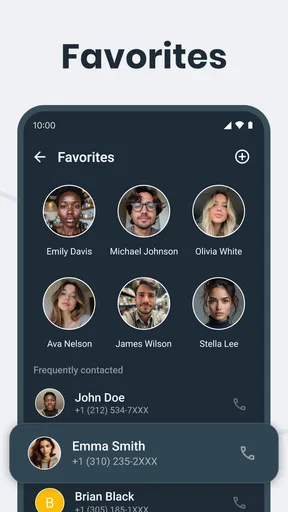
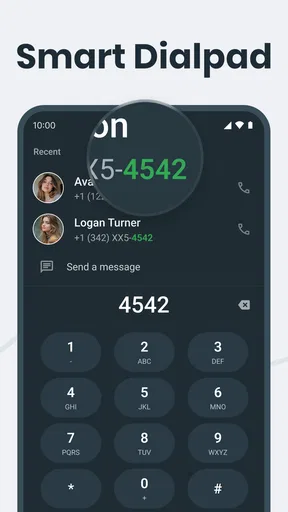
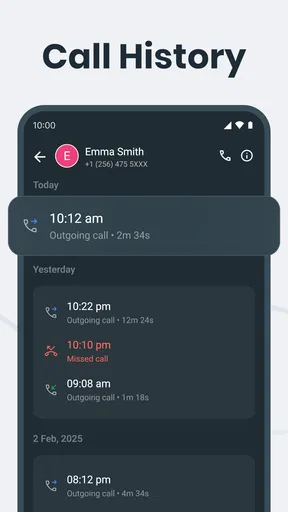
 Analysis by AppCompare
Phone Call is the kind of Android tool I would install when the ordinary phone app starts feeling too limited. It brings caller identification, call blocking, and several smart call-management touches into one focused place instead of making me jump between the dialer, recent calls, and separate blocking tools. I found its appeal less in flashy extras and more in creating a calmer routine around incoming and outgoing calls.
It is a free app from Call Log Manager, listed in the Tools category and suitable for Everyone. The app reached the store on April 7, 2025, and its current version is 1.19, with Android 7.0 or later required. That broad compatibility is useful if you are keeping an older phone, although the experience can still vary depending on the phone maker’s own dialer and permission controls.
The public response is encouraging: Phone Call holds a 4.2 average from around twenty-two thousand ratings, with over five million installs. I would not treat those figures as a guarantee that it will suit every phone, but they do suggest that the basic idea is working for a substantial audience. My own recommendation is straightforward: try it if you want more control over who reaches you and how you handle recent calls, but spend a few minutes setting it up properly rather than expecting it to fix everything automatically.
Building a dependable everyday call routine
The best way to use Phone Call is to begin with a simple baseline workflow. I would first use it as the place where I check unfamiliar callers, review recent activity, and decide what deserves a response. That sounds modest, but it prevents the common habit of answering every interruption and sorting out the consequences later.
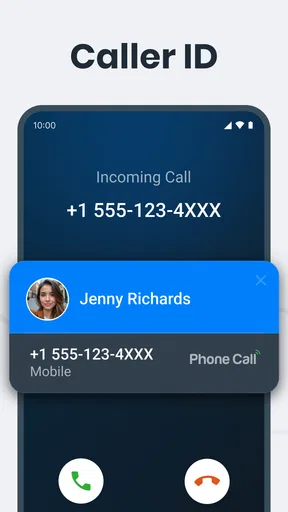
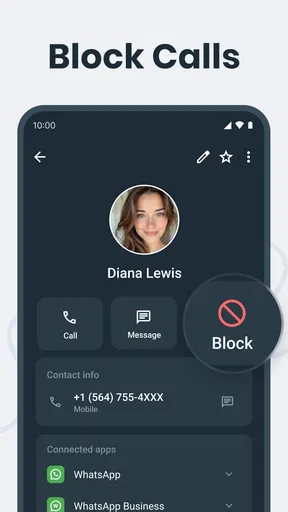
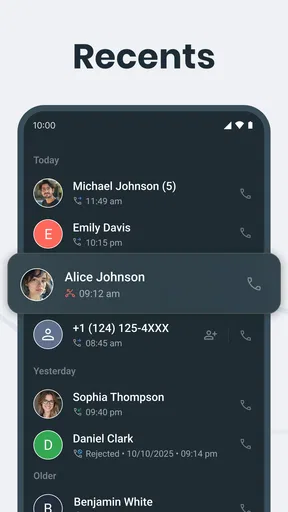
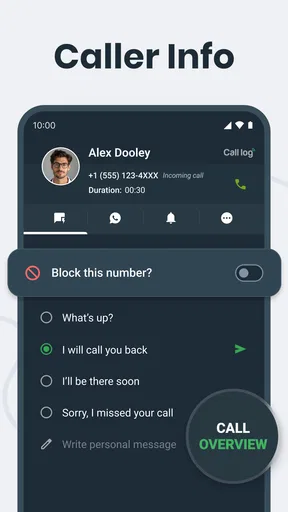
For a normal day, the routine is easy to understand. An incoming call appears, the caller ID information helps me judge whether it is worth answering, and blocking is available when a number has crossed the line from unfamiliar to unwanted. Afterward, the recent-call view becomes a practical record for returning genuine calls, ignoring repeated nuisance attempts, or saving a number that turns out to be useful.
I especially like this approach for people who receive a mix of personal calls, delivery calls, work contacts, and unknown numbers. A completely aggressive blocking strategy can make you miss something important. Phone Call is more useful when I treat caller ID as a decision aid rather than an automatic verdict. If a number is not recognized, I can pause, consider the context, and then choose whether to answer, return the call, or block it.
A realistic example is a busy weekday when several unfamiliar calls arrive while I am working. Instead of interrupting a meeting for each one, I can glance at the identification information, let questionable calls go unanswered, and review the list later. If the same unwanted number keeps appearing, I can block it once and stop spending attention on it. That small change makes the app feel less like a replacement dialer and more like a filter for mental clutter.
Worth Reading Before You Choose

EA SPORTS FC Mobile 26 Is a Bigger Football Game, but It Takes Time

Flipboard Shows What News Apps Must Do Beyond the Feed

Switching to Android Auto Means Rethinking Your Driving Routine

Google Calendar Makes a Crowded Week Easier to Manage

Ludo King Makes the Most of the Minutes Between Plans

Baby Panda World Brings Quick Play to Modern Phones, but Its Game Library Feels Busy
There is also a useful distinction between blocking a number and simply not responding. I would reserve blocking for repeated spam, harassment, or a caller I know I never want to hear from. For a one-time unknown call, leaving it alone is often safer than making a permanent decision based on incomplete information. Experienced use means keeping that difference clear.
What the first setup should accomplish
On the first run, I would focus on the parts that affect real call handling: caller identification, blocking behavior, and whichever phone-related access the app requests. Android may show its own confirmation screens, and some manufacturers place additional restrictions around call management. I would read each prompt rather than approving everything automatically, because call-related tools need the right access to be useful, but they also touch sensitive parts of the phone.
I would then make one test call from a trusted number and check how the app presents it. A test is more helpful than assuming the setup is complete. It shows whether the information appears at the moment I need it and whether the phone’s default dialer still behaves as expected. If the app and the built-in phone application compete for the same role, I would decide which one I want handling everyday calls instead of leaving the arrangement ambiguous.
The important habit is to establish a small personal rule. For example, I might answer known contacts immediately, review unfamiliar numbers when convenient, and block only after a clear pattern. That rule makes the app’s features work together. Without a routine, caller ID becomes decoration and the block list becomes an unmaintained collection of impulsive decisions.
Settings that deserve a careful review
Phone Call is more useful when I treat its settings as part of the workflow, not as a screen to rush through. I would check how caller identification is displayed, how blocked calls are handled, and whether the app’s behavior fits the way I already use my phone. The right choice for someone who wants maximum quiet may be wrong for a person waiting for a courier, a clinic, or a new employer to call.
Blocking deserves the most thought. A broad approach may reduce interruptions, but it can also hide a legitimate call from a number that is not saved in contacts. I prefer a gradual list: block numbers that repeat unwanted behavior, keep uncertain numbers unblocked, and review the list occasionally. This is a practical trade-off, and no caller-ID tool can remove the need for judgment in every situation.
I would also check whether notifications or call information are too prominent for my taste. Caller identification is useful when it is visible at the right moment, but constant attention-grabbing alerts can replace one annoyance with another. If I am trying to make my phone quieter, I want the app to support that goal rather than encourage me to inspect every event immediately.
Privacy is another reason to be deliberate. A call-management app naturally handles information connected with phone activity. I would look at the Android permission prompts and the app’s settings before enabling anything that is not necessary for the way I plan to use it. That does not mean avoiding the app; it means understanding that convenience and access are linked.
Phone Call is free, which removes the usual payment barrier for testing it. Still, free does not mean frictionless. The real cost may be time spent adjusting permissions, choosing a default calling workflow, and correcting an overenthusiastic block list. For me, that setup is worthwhile only if unwanted calls are a regular problem. Someone who receives very few calls may find the built-in phone app simpler.
Small habits that make the app faster
The fastest users do not necessarily use more features. They make the same decisions consistently. I would keep important contacts saved with recognizable names, because caller ID is much more useful when it complements an organized contact list. I would also avoid saving every unknown number immediately; first decide whether it is genuinely relevant.
Another helpful pattern is to review recent calls at a fixed time rather than whenever the phone rings. This turns the app into a manageable queue. I can return important calls together, block obvious repeat offenders, and leave low-priority numbers alone. It is a better use of attention than repeatedly reopening the call list throughout the day.
When I do block a number, I would remember why. A short mental note such as “repeated sales calls” or “wrong number several times” makes later review easier. This matters because a block list can become confusing after months of use. If a legitimate caller is accidentally blocked, I want to recognize the mistake quickly instead of wondering why the phone never rings.
I also find it sensible to use the app differently depending on the day. During work or sleep, stronger filtering may be valuable. During travel, a medical appointment period, or a job search, I would be more cautious with unknown numbers. The app gives me a way to manage calls, but the best outcome comes from matching the settings to the current context.
Where it improves on the usual alternatives
The standard phone app has one major advantage: it is already integrated with the device and usually needs little thought. If all I need is dialing, contacts, and a basic recent-call list, the built-in option may remain the better choice. It is familiar, tends to follow the phone maker’s design, and avoids adding another layer to a sensitive task.
Phone Call becomes more compelling when the built-in tools feel scattered or too basic. Instead of treating caller ID and blocking as unrelated chores, it puts them under one call-management idea. That makes it easier for me to create a repeatable process: identify, decide, block when justified, and review later.
It also occupies a useful middle ground between a plain dialer and a highly specialized spam service. I would not choose it solely because I want a massive database of every possible nuisance caller, nor would I expect it to replace a full contact-management system. Its strength is practical control over phone calls rather than an attempt to become an all-purpose communications hub.
There is a trade-off in that middle ground. A dedicated spam-focused alternative may be better for someone whose main problem is relentless fraud calls and who wants the most aggressive automated filtering available. A privacy-conscious user may prefer the smallest possible tool and accept fewer identification features. Phone Call makes sense when I want a focused set of call tools without committing to a much larger communication platform.
Limits that experienced users should understand
Caller ID is helpful, but I would never treat it as proof of identity. A familiar-looking number can still be misleading, and an unfamiliar number can belong to someone important. The app can improve the information around a call; it cannot turn every incoming number into a certainty. For financial, medical, or account-related requests, I would still verify the organization through a trusted channel.
Blocking is similarly imperfect as a complete answer to spam. Unwanted callers can change numbers, use different lines, or stop calling for a while and return later. That means the block list works best as a maintenance tool, not a one-time installation step. I would expect to revisit decisions occasionally, especially if my phone number is used for work or public-facing services.
Android compatibility is broad because the app supports Android 7.0 and later, but older and newer phones do not always handle call applications identically. Manufacturer software can affect default-app choices, background activity, notifications, and the way call screens appear. If a feature seems inconsistent, I would check the phone’s own battery, notification, and default-app controls before blaming the app alone.
There is also a learning curve for people who want everything to happen automatically. Phone Call rewards a little involvement: choosing what to block, checking whether caller identification is presented clearly, and keeping contacts in order. If you want a completely invisible system that makes every decision without review, this may feel less convenient than expected.
Finally, anyone who rarely uses voice calls may not gain much from installing another call tool. People who communicate almost entirely through messaging apps can probably stay with the phone’s existing functions. Phone Call is at its best for people whose daily life still includes enough unknown, repeat, or time-sensitive calls to justify a dedicated routine.
Who I would recommend it to
I would recommend Phone Call to Android users who want a clearer way to handle unknown callers without turning call management into a complicated project. It suits people who receive recurring sales calls, freelancers who need to distinguish clients from interruptions, families managing calls on an older device, and anyone who wants blocking and caller identification close together.
I would be more selective for users with strict privacy preferences, very low call volume, or a strong preference for the manufacturer’s original dialer. Those users may reasonably decide that the extra setup is not worth it. I would also suggest caution to anyone who tends to block numbers impulsively, because the convenience of a quick block can become a problem when an important caller uses a new or unsaved number.
The app’s Everyone age rating makes it approachable for a wide range of users, but younger or less technical users may still need help during setup. The important part is not the age label; it is understanding which call behavior is being changed and how to undo a decision if a number is blocked by mistake.
My verdict after settling into the workflow
After using Phone Call as a daily call-management layer, I see its value in the routine it encourages. Caller ID helps me make a quicker first decision, blocking removes repeat distractions, and the recent-call workflow gives me a place to deal with calls on my own schedule. None of those ideas is revolutionary by itself, but together they make ordinary phone use less reactive.
The app is not a magic shield against every unwanted call, and it should not replace sensible verification. Its results depend on permissions, the phone’s own software, and the discipline of maintaining contacts and blocked numbers. Those limits are important, but they do not cancel out the central benefit: I get more control without needing a large, complicated communications suite.
With a 4.2 average and more than five million installs, Phone Call has clearly found an audience, while its free price makes experimentation easy. I would start with a conservative setup, test it with a known contact, and add blocking decisions gradually. The most effective approach is not maximum filtering; it is predictable filtering that matches the calls you actually need.
My final recommendation is positive for Android users who still rely heavily on voice calls and want a more deliberate way to manage them. I would choose the built-in dialer for simplicity, a more specialized service for aggressive spam protection, and Phone Call for the balanced middle: a focused tool that helps me identify, sort, and block calls while leaving the final judgment in my hands.
Pros
- Simple interface makes calling contacts quick and easy.
- Supports essential calling features without unnecessary complexity.
- Clear contact organization helps find frequently called people.
- Works well for users who prefer a traditional phone experience.
- Useful for managing everyday calls from one central place.
Cons
- Call quality may depend heavily on your carrier or network signal.
- Some features can vary between Android and iOS devices.
- The app may require access to contacts and microphone permissions.
- Limited customization compared with advanced dialer applications.
- Unknown callers may still require separate spam-blocking tools.
FAQs for Phone Call
What is Phone Call, and what can I use it for?
Phone Call is a communication app designed to help users make, receive, and manage voice calls from a mobile device. Depending on the version and available services, it may include features such as contact management, call history, speaker mode, keypad access, and caller identification. Before downloading, check whether it supports your preferred calling method and works with your device, carrier, and region.
Is Phone Call free to download and use?
The Phone Call app may be free to download, but some features can depend on your mobile carrier, internet connection, subscription plan, or in-app purchases. Regular cellular calls may use your phone plan’s minutes, while internet-based calls can consume mobile data or Wi-Fi. Review the app’s store listing and pricing details carefully before making calls.
Does Phone Call require an internet connection?
Whether an internet connection is required depends on how Phone Call handles calls. If it works as a standard phone dialer, calls are generally placed through your cellular network and may not require Wi-Fi or mobile data. If it offers internet calling, messaging, or cloud-based features, a stable Wi-Fi or mobile data connection may be necessary. Availability can vary by device and location.
What permissions does Phone Call request, and are they safe?
A calling app commonly requests access to the microphone, phone functions, contacts, call history, and sometimes notifications. These permissions allow it to place calls, display caller information, and manage contacts or recent calls. You should review each permission before granting access and disable anything unnecessary. Download the app only from a trusted store and check its privacy policy.
Will Phone Call work on my Android or iPhone?
Phone Call compatibility depends on the specific app version, operating system, device model, and local carrier support. Check the official Google Play or App Store listing for minimum Android or iOS requirements before installing. Some features may also be unavailable on tablets, older phones, rooted or modified devices, or in certain countries because of network and regulatory restrictions.


